Contributing art to Route 10
Route 10 is a little pixel-art game about Jefferson, Stamford, and Hobart — meant to be painted by the people who actually live there. You don't need to know how to code.
What we're looking for
Right now, most of all: building facades. Every real business and landmark starts as a plain placeholder box with its name on it, waiting for someone who knows what it looks like to paint it in. See the list below for what's still open.
Later we'll also want people — character sheets and portraits — but facades come first, since they're what makes each village recognizably itself. Until someone paints them, the folks you meet are placeholder townspeople, and the story data gives each of them a look — hair, build, and their own colours — so the cast tells itself apart in the meantime. A painted character sheet replaces that person's placeholder entirely.
How to paint one
Easiest: the in-browser Studio, which locks the canvas size and color palette for you, so there's nothing to get wrong.
https://tomhennen.github.io/mainstreet/studio/
Pick the building you want, and it sets you up with a correctly-sized, correctly-paletted canvas to draw on.
If you'd rather use a "real" pixel art tool, that works just as well — there's a list of ones people use under "Prefer a real pixel-art app?" below, and the spec to follow by hand is further down again.
Drawing on a phone
The Studio is happy on a phone, and this is all there is to it:
- One finger draws with whichever tool is selected.
- Two fingers zoom and pan — pinch to get right in close to a few pixels, and slide to move around a drawing that's bigger than the screen. Starting a pinch never leaves a stray dot behind: whatever the first finger touched goes back the way it was.
- Lock (on the canvas frame, top right) tells the canvas to ignore one finger, so you can scroll the page past it to reach the tools and the palette. Two fingers still zoom and pan while it's locked. Tap it again to paint.
- More opens the rest of the tools — line, rectangle, mirror, brush size, the grid, the faint guide, the extra rows above the roofline, and the buttons that step the door and plaque markers along.
The drawing opens sized to fit your screen, and the little ×6 beside the zoom buttons on the frame says how big a pixel is right now. Under the tools sit the colour you're painting with and the last few you used, with All 64 colours to open the whole palette, grouped by colour family.
Prefer a real pixel-art app?
That works just as well, and some of them are lovely to draw in. Our sizes are small and exact (32 to 96 pixels wide, heights in steps of 16), the background has to be transparent, and the palette is Resurrect 64 on Lospec — so the two things worth checking in any app are whether you can set the canvas to an exact size like 80 × 48, and whether you can load our palette.
Here's what we could confirm from each app's own site or store listing, checked on 7 September 2026. Where a page didn't say, we've written "unverified" rather than guess — do have a look yourself before you buy anything.
| App | Where it runs | Price | Palette | Notes |
|---|---|---|---|---|
| Pixquare | iPhone, iPad, Mac | Free to download with an in-app purchase; the maker's FAQ describes it as a one-time purchase — $24.99 for all devices, or $7.99 iPhone-only | Saves and loads Lospec palettes from inside the app | Exports PNG, GIF, MOV and sprite sheets, and supports Apple Pencil. Exact canvas sizing unverified. |
| Pixel Studio | iPhone, iPad, Android, Windows, macOS | Free, with in-app purchases | Downloads palettes from Lospec in-app; also reads JASC .pal and Aseprite .ase files | Says "unlimited canvas size" and canvas resizing, and exports PNG. Apple Pencil and S-Pen. |
| Resprite | iPhone, iPad | Free to download; $1.99 a month, $14.99 a year, or $24.99 once | Reads .gpl files, and imports palettes straight from a Lospec link | Interactive canvas resizing and sprite-sheet export. Transparent-PNG details unverified. |
| Dotpict | iPhone, iPad (there's an Android version too; we couldn't check its store page) | Free, with a $3.99 premium unlock | Preset palettes, and you can build one from a photo; loading a palette file is unverified | The listing offers "several different canvas pixel sizes to choose from" and names 96 × 96 as the largest. Whether you can set an exact size like 80 × 48 is unverified, so it's worth a look before you start. |
| Aseprite | Windows, macOS, Linux | $19.99, paid once | Loads .gpl palette files, and the Studio's .hex download works in it too | The long-standing favourite for work like this. Desktop only. |
| LibreSprite | Windows, macOS, Linux | Free and open source (GPL v2) | "Ready to use palettes, or make your own"; the formats it reads are unverified | A free, community-run fork of an early Aseprite. |
| Piskel | Any desktop browser, plus free downloads for Windows, macOS and Linux | Free and open source | Not stated on its site; .gpl is what people generally use with it | Its site says it's "best used in a desktop browser and in landscape orientation", so it's a desk tool rather than a phone one. |
| Lospec Pixel Editor | Desktop browsers | Free | Any palette from Lospec's own list, in one click | Simple and pleasant, though the page notes it is no longer being developed and only works on desktop browsers. |
If you use something that isn't on this list and it works well, tell us and we'll add it. Whichever you pick, set it up like this:
1. Load the palette Resurrect 64, which is on Lospec: https://lospec.com/palette-list/resurrect-64. (The Studio will also hand you the same palette as a .png or a .hex file, under "Painting somewhere else?".) 2. Use the size for your building from the table at the bottom of this page — the width is fixed; the height can be that or taller in steps of 16 pixels, with the extra rows at the top for a roof or a sign. 3. Export a PNG with a transparent background and no smoothing.
Then either import the PNG in the Studio — it checks the size, nudges any near-miss colors onto the palette, and tells you what it changed — or just email it to us as an attachment. Both land in the same place.
What good enough looks like
Here's a plain, ordinary building at the size and level of detail we're hoping for — a flat wall, a roof band, a few windows, a door, a sign. Nothing fancy; that's the point.
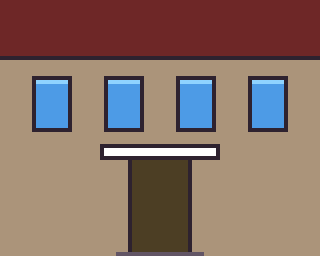
This one was made by a computer to show size and detail. We won't put computer art in the game; we'd rather have yours.
Anything at this level of finish or better is very welcome — and rougher first tries are welcome too. We'll help you get it over the line.
The spec in plain words
- Everything sits on a 16×16 pixel grid — like building out of little square bricks.
- Save as a PNG with a transparent background.
- No smoothing or anti-aliasing — turn it off if your tool defaults to it. Pixel art wants hard, clean edges.
- Use only the colors in the game's palette. The Studio locks this for you; in Aseprite or Piskel, load the palette file first and pick from it.
- Width = the building's footprint width in tiles, times 16 pixels.
- Height is a multiple of 16, and can be taller than the footprint — the art sits on the bottom of the canvas, and any extra rows above are where a roof, awning, or hanging sign goes.
- You choose where the door goes. Two little chips sit on the strip under the Studio's canvas, one for the door and one for the plaque, and you can put them in any column you like — drag them along the strip, or use the ◀ ▶ buttons under More. The game reads them for where a player knocks and where your name hangs. They're markers, not paint: they never appear in the picture.
Exact sizes for every open building are below.
How to send it
The Studio's Send it to the town button opens a short form with your drawing filled in; press Submit there and you're done — there's no account to make and no email app to wrestle with. Your drawing travels as a short line of text, along with the name you'd like credited and anything you'd like to say with it, and the size of the drawing doesn't matter. If you moved the door or the plaque, that goes along too. A very large drawing leaves the code out of the form's link and copies it for you instead — the Studio tells you when that happens, and where to paste it in.
Since pressing Submit on that page is between you and Google, if you'd like to be sure it arrived, open Didn't go through? underneath, copy the code, and paste it into an email to tom.hennen+mainstreet@gmail.com — it lands in exactly the same place.
Painted outside the Studio? Email that same address and attach the PNG. If you'd like the door somewhere other than where the placeholder has it, just say which column in the email — counting the tile columns across the front of the building — and we'll set it that way.
Either way, include the name you'd like credited. We may nudge colors or proportions slightly to fit, asking first for anything big — and your name goes up as the painter regardless: on a small plaque beside the door of the building you painted, where anyone walking past can read it, and on the site's front page under the town you painted for. It doesn't appear in the building's sign, so the story the game has to tell about the place stays uninterrupted. The plaque itself is the game's own — you never have to paint one, it goes on top of your art — but where it hangs is yours to choose.
Want to touch up a building that's already painted? Open it in the Studio and look for Improve it? — it brings in the painting as it stands in the game today, as real pixels you can change, rather than starting you over from the placeholder guide. The building's own plaque, right there beside its door in the game, carries the same Improve it? link, so you don't have to go hunting for the Studio by hand. Send it in the same way as anything else. A touch-up of someone else's painting gets credited to both of you, in the order you painted, unless the original painter has asked otherwise — just say so in the email if that's what's happening.
The kindness rule
Real businesses and places are drawn with the same affection we'd want for our own storefront:
- No pasting in real logos or trademarked signage — paint your own take on the place instead.
- No real private people appear without their own say-so first.
- Keep it warm. If in doubt, make it kinder.
Where AI fits
The game's code, maps, and tools get built with AI help — that's normal here. The art that ships in the towns doesn't: no model-generated pixel art goes into a world pack. Every facade, character, and portrait is painted by a person. If AI helped you get there behind the scenes — turning a photo of a building into a plan you then finished by hand, say — that's fine, and your credit can say so, in your own words. An unpainted building stays a plain placeholder box until someone paints it. That's not a gap to patch quickly; it's the invitation this whole project runs on.
Licenses
- The game's code is Apache 2.0 — see
LICENSE. - Art and world content, including everything you contribute, is Creative Commons Attribution 4.0 — see
LICENSE-CONTENT.md. In short: anyone may copy, share, adapt and use it, commercially too, as long as they credit the creator — exactly whatcredits.jsonand the "painted by ___" credit it feeds are for.
Buildings waiting for an artist
Middle Brook Cafe has its first coat (thank you, Tom and Lana), and so has Heartbreak Hotel (thank you, Tom) — both are open for touch-ups any time. Every building below is still a placeholder box, and any of them is up for grabs:
| Building | Village | Size (pixels) |
|---|---|---|
Jefferson Town Hall (jefferson-town-hall) | Jefferson | 80 × 48 |
Mill Pond Inn (mill-pond-inn) | Jefferson | 80 × 48 |
Stewart's (stewarts) | Stamford | 96 × 64 |
Mac-A-Doodles (mac-a-doodles) | Stamford | 64 × 48 |
Stamford Coffee (stamford-coffee) | Stamford | 80 × 48 |
The Belvedere (the-belvedere) | Stamford | 80 × 48 |
Cellar Door Wines (cellar-door-wines) | Hobart | 80 × 48 |
These are minimums — width is fixed by the footprint, but add extra rows above for a roofline, sign, or anything that makes it feel like the real place.
Not painting? Write to us anyway
Have a story idea, a bit of local lore, someone who should be in it, or something we should fix? Write to us (a short form, no account needed; or email tom.hennen+mainstreet@gmail.com) — there's a suggestion box by the Town Hall door in Jefferson that opens the same note. Ideas are as welcome as paint, and a used one gets a "story by" credit on the front page, just like a painted building gets its painter.
If you want to work on the code instead, start with CLAUDE.md.